How many times a day do you watch videos? Add up all the clips you find on Facebook, Twitter, Instagram, Snapchat, not to mention when you’re bored at work or in class.
Introduction
It can be overwhelming and certainly entertaining when you think back on how much videos play a part in our daily lives. Not just for entertainment, the late influx of videos have helped a lot of people learn new skills: tying a bow tie, mastering origami, learning musical instruments, or even unlocking achievements in Temple Run—we use videos for a lot. Hence why I’ve written this guide to the best YouTube secrets that you won’t find in one place anywhere else. I’ve compiled information from a multitude of sites and thrown in some of my personal tricks to ensure you are a YouTube power user by the end of this article.
YouTube is already a great site, out of the box. But by learning to plumb its depths, you can make the site really work for you, and make your YouTube experience much more personal and enjoyable. The secrets below will range from adjusting settings while watching a video to embedding a clip onto your own website, to uploading and editing videos. This will take you from being someone who watches YouTube to being someone who uses YouTube. There is a wide range of options when it comes to YouTube and I won’t be the one to stop you from making the most out of this incredible resource.
“The evolution of social media into a robust mechanism for social transformation is already visible. Despite many adamant critics who insist that tools like Facebook, Twitter, and YouTube are little more than faddish distractions useful only to exchange trivial information, these critics are being proven wrong time and again.” – Simon Mainwaring
A Bit About YouTube
Even if you haven’t previously heard about YouTube you certainly have seen a video hosted by them if you browse the web and are on social media accounts. YouTube is owned by Google, which means they have a tremendous backing, allowing them to dominate search engine results and utilize petabytes of potential storage.
In case you’re still wondering exactly how popular YouTube is, they have more than 1 billion unique visitors every month, including on average over 6 billion hours of video watched each month. You can be sure that YouTube is one of the great revenue sources of Google, allowing them to include ads before the video and on the sidelines of their site.
Early in the 20th century, motion picture came to be seen as a potential powerhouse of mass communication. It wasn’t until the advent of home video, though, that the means of producing videos could be made affordable (and less complicated) enough to be used by more and more people. This democratization of video was incomplete, however, since a means of distribution was still out of reach. This is where YouTube comes in. One of the most innovative features of YouTube is that anyone can upload any video they choose and it will be public to the world. This has spawned a tremendous following with popular accounts having millions of followers. YouTube is responsible for making famous musicians, ousting political atrocities, spreading the word about disease or information, and captivated audiences with hilarious videos.
Absolute Best YouTube Secrets
Below is a cultivated list of YouTube secrets that will make your viewing even better. It will also help you if you ever decide to upload a video or want to manipulate a video to make sure you get every detail and second.
Use The Force Luke – YouTube Secret
One of my very favorite secrets is the “Use The Force Luke” trick. This is awesome, especially if you are a Star Wars fan. Even if you’re not, you can surely impress your friends by doing this little trick when you’re on YouTube.
Basically if you type in “use the force luke” without the quotation marks it will star to make the screen hover from side to side. It sort of looks like everything is floating back and forth. You can make it move even more if you swipe your mouse across the screen. This will make all the search results and everything fly from left to right or vice versa.
To make it stop, you will have to search for something new so that it resets the normal YouTube.
Beam Me Up Scotty
Of course, there’s always a bit of a rivalry between Star Wars fans and fans of that other American science fiction powerhouse, Star Trek. So if you’re more of a Trekkie than a Star Wars fan (what are they called… Wookies?), you’ll be glad to know that your fandom has not been neglected.
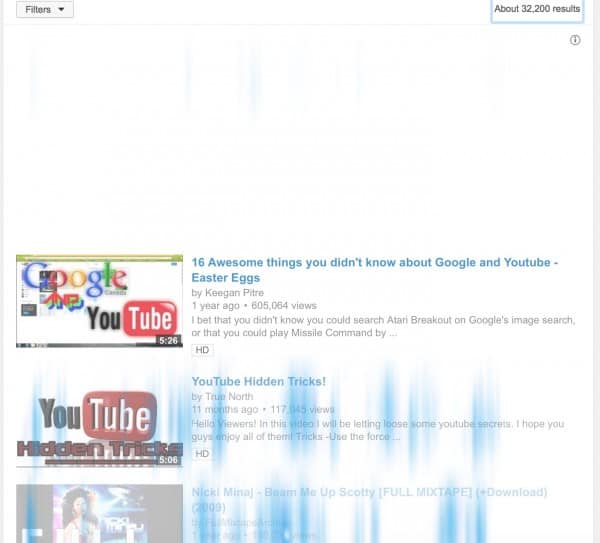
The next and also super cool trick is a bode to Star Trek and all the Trekkie fans out there. If you head over to YouTube.com and type in “beam me up scotty” without quotation marks you will see the screen look like below, where you have streaks of blue making it look like the screen is being beamed up.
Of course, this doesn’t really do anything functional but it is fun to show your friends, especially if they are Star Trek fans and would appreciate these things. This won’t work if you are watching an embedded video so you will have to go straight to the YouTube website for it to work.
Do the Harlem Shake
This one is a bunch of fun if you know the Harlem Shake. Harlem Shake was a… I guess it was something like dance sensation that blew up all over social media. Like a lot of social media trends (when have you last planked?) it seems to have disappeared completely, so it’s neat to know that it has been preserved in one form or another through the hidden protocols of YouTube.
Head over to YouTube and type in “do the harlem shake” (as always, no quotes). This one takes a little bit of time before it really starts going, so you’ll have to be patient. At first, you will notice a normal search result but the YouTube symbol at the top left will start to shake back and forth while the Harlem Shake will begin to play. But that’s not all; give it enough time, and all the search results really start getting into it, just like in all the Harlem Shake videos where one person starts things out pretty slowly, and next thing you know, an entire bus full of football players is flailing about.
This can catch someone off guard if they’re not expecting the music to actually play. Make sure you have your volume turned up if you can’t hear the sound on it. That is it for this secret, not much more to it than that.
YouTube Video in Slow / Fast Speed
Those previous tips are mainly games—fun little easter eggs just for your amusement. These next couple of tips, though, are much more functional and fill actual needs in the YouTube experience.
You may not have known, but you can slow down or speed up any video on YouTube with the click of a few buttons. This will help you be able to catch every moment of a fall or speed up the boring parts to get to the best part of the video. You can even decide how fast or slow you want to make it, from 1/4 of the speed to 2x times the speed of the original video.
To slow down or speed up the video, simply click on the little gear icon at the bottom right of the video. You will notice a few different options and on there, you can choose speed. simply click the button and select anything from 0.25 speed to 2.0 speed. Of course, you can always change your mind later on if you want to go back to regular speed.
Note, that if you don’t see the gear icon, you may need to hover over the video with your cursor or tap on the video for the options to show up. This should work on both videos on YouTube as well as embedded videos.
Turn on Closed Captioning (Subtitles)
Another awesome YouTube secret that you may not realize is that you can add subtitles to any video you want. When you go to upload a video there will be an option that you can add subtitles and that will make it so people can read along with your video if they don’t want to turn the volume on.
This is a great option if you’re at work and don’t want the noise to bother your coworkers. Also, this is good for people who may not know english as their first language. It’s sometimes easier to read than to listen and understand if it’s not your native language. Of course, the Close Captions aren’t always native to the video; a lot of times, its the YouTube protocols themselves attempting a transcription of what they think the video is saying. This can sometimes result in a good deal of unintentional hilarity when the transcription is way off from the dialogue.
If you’re uploading a video, simply head over to the video manager and click edit. From there, you will notice a CC or add Subtitles to your video option. Simply click it and you can type out your subtitles as you watch the video.
If you’re watching a video and want to turn them on, you can hover over the video and click on the little “CC” at the bottom right. You can also click on the settings gear and from there you will have an option to turn on subtitles and even change the language to your native language.
Start YouTube Video At Specific Time
The next secret is to start a video at a specific time. Say there is a long 10 minute video but you just want to share a specific clip from it and don’t want your friends to have to sit through the entire video to find it. You can share the link to the video and from there, you can specify when you want the video to start.
To make this secret work, take the original YouTube url :https://www.youtube.com/watch?v=w3y6ZVN3IQ4 and from there you will want to add #t=XXmXXs to the end of the url. Replace the two XX with your desired minutes and seconds into the video that you want to start. For instance, if you want your friends to start watching at 1 minute 38 seconds into the clip above, you would share the following url: https://www.youtube.com/watch?v=w3y6ZVN3IQ4#t=01m38s
The only downside to this trick is if there is an ad before the video starts you will have to sit through the advertisement first. Also, it may not wind up taking you to the desired place in the video because the ad messes it up.
Check Your YouTube Speed History
Another great trick is that you can test your very own YouTube speed history, which will show you whether your internet is running slow or if it’s actually the YouTube servers. Most of the time it’s likely your internet connection.
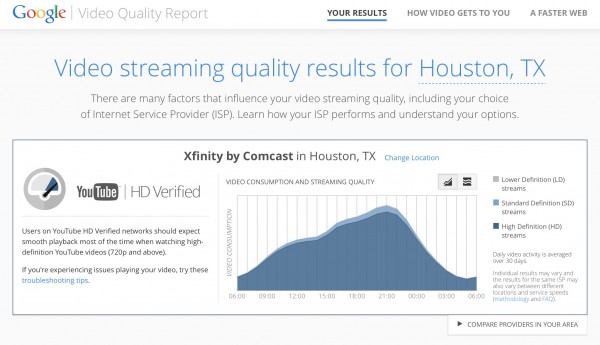
Head over to the Google Video Quality Report to get your own personalized YouTube speed test. This will break down when you watch the most videos on YouTube and also the average speed that you watch them. You can see that mine peaks around 9pm with 92% of my videos that I watch then are HD quality.
Google will average out your last 30 days so you can get an idea of when you watch videos the most and when you typically have slower internet connection, as indicated by lower percent of HD videos. Most likely, around 9pm there are a lot of people on Comcast and that slows down the entire network. Otherwise, during off peak times my HD streaming percentage increases.
You can also test how your speed compares to other people’s speed in your area and with the same internet service provider.
YouTube TV Secret
The last secret I’ll leave you with is how to watch TV on YouTube, from your favorite shows to clips of movies and music videos, you can head over to the TV section of YouTube and watch whatever you want to watch.
Simply head over to the secret YouTube TV site and select what to watch. This is a great option if you’re streaming through AirPlay or syncing your device with your TV so you can watch TV on YouTube similar to if you were just watching cable. Another cool feature is that one video ends and another one starts so you won’t need to keep on selecting a video to watch.
That wraps up this guide on the absolute best YouTube secrets out there. Let us know below if you found any of them super helpful. Also, we would appreciate if you shared this post with all of your friends so they can enjoy using YouTube to the fullest from now on.